
The Advally XenForo plugin includes a privacy opt-out that lets individual users disable advertising data sharing. When opted out, the plugin stops generating a hashed identifier for that user’s session.
What Data Is Shared
When a logged-in user visits a page with Advally ads, the plugin generates a SHA-256 hash of the user’s email address (normalized to lowercase with any +tag and Gmail dots removed). This hash is passed to the Adligature ad platform for frequency capping and cross-site identity purposes. The original email address is never transmitted — only the one-way hash.
User Opt-Out
Users can disable this behavior in their XenForo account settings:
- Go to Account → Privacy.
- Check Disable advertising data sharing.
- Save.
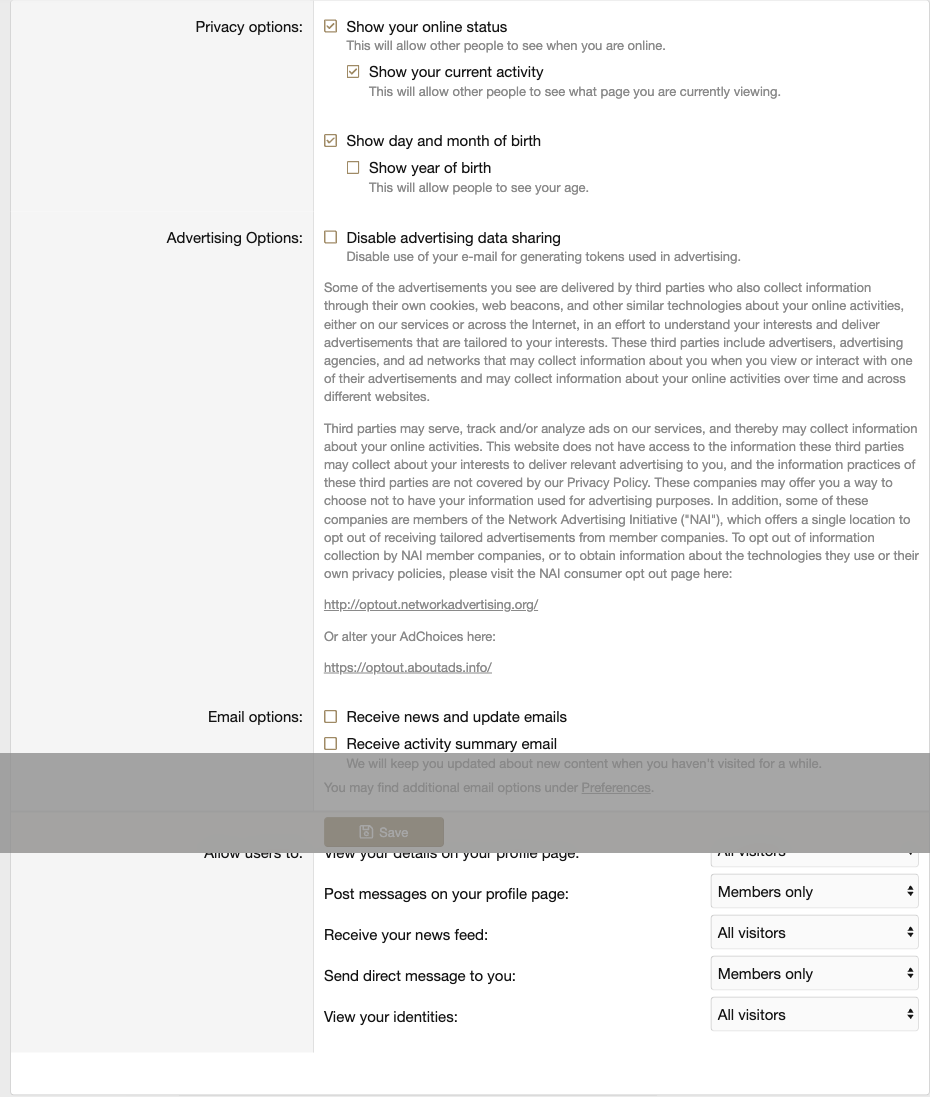
When this option is checked, the plugin skips SHA-256 hash generation entirely for that user’s ad requests. No identifier is passed to Adligature.
GDPR Considerations
The SHA-256 email hash is a pseudonymous identifier. While it cannot be directly reversed to an email address, it can still constitute personal data under GDPR if the receiving party can link it back to an individual. Consider:
- Including this data sharing in your forum’s Privacy Policy.
- Surfacing the opt-out checkbox prominently during user registration or in your cookie/consent banner.
- Disabling hash sharing for all EU users by default if you operate under strict GDPR interpretation.
The opt-out is stored in the xf_user_option table per user and persists across sessions and devices.