
You can! If you’re a bit more savvy than most with code, we have a self-serve portal that allows you to create and launch a bunch of different types of advertising.
Contained right within our Reporting System, there is a page customized to your property specifically. This page has instructions on how you can create your own tags and launch various types of units on your site without emailing back and forth.
Contained within this is the Tag Generator which is the interface you use to create new tags.
Contained right within our Reporting System, there is a page customized to your property specifically. This page has instructions on how you can create your own tags and launch various types of units on your site without emailing back and forth.
Contained within this is the Tag Generator which is the interface you use to create new tags.
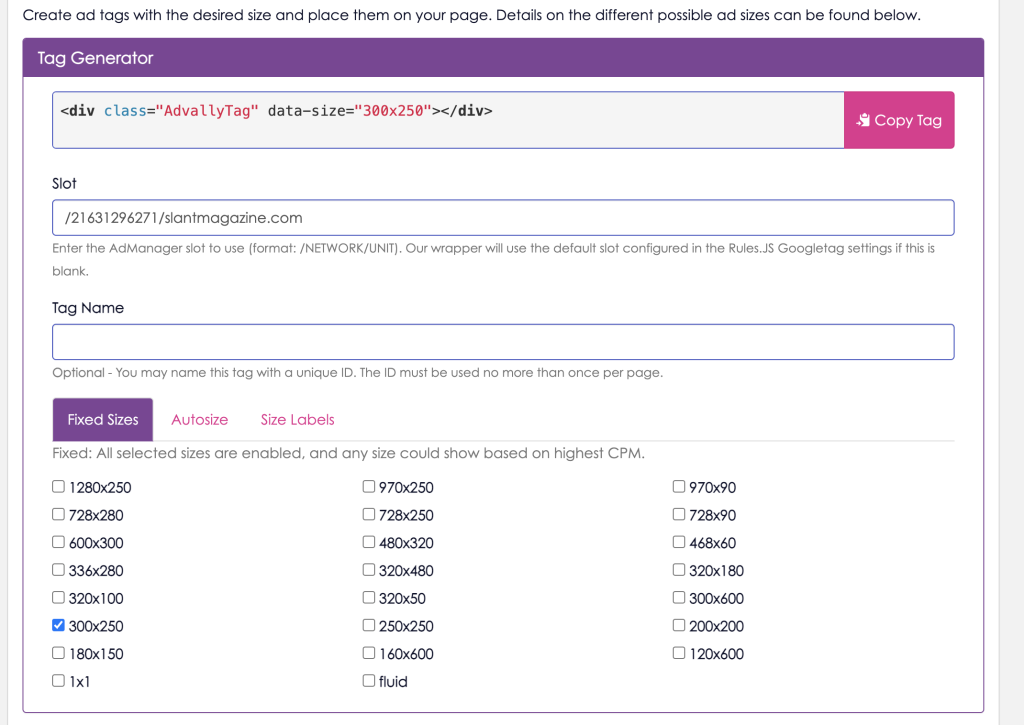
Make sure that you read all of the instructions however, because when someone from [email protected] creates tags for you we ensure every step is followed.
What is the difference between Google Tags and AdvallyTags? Why should I use Advally Tags?
Google Tags exported directly from Google Ad Manager are typically incomplete and will require additional changes to work correctly on most sites. These tags are non-responsive, so you would have to create custom size maps for them to render correctly on all devices. Google Tags are also not configured by default to lazy load or refresh, two important techniques for improving viewability and overall yield. You would have to write your own custom integration for handling in-view refresh, and lazy loading.
Finally, the Google Tag scripts are exported individually and will have to manually combined and adjusted to suit the ad plan of each specific page. Your site likely has many different templates, each with their own layout and ad requirements. The Google Tag header script must be adjusted to suit each paeg accordingly.
Our AdvallyTag wrapper is a management layer to make deployment easier and more reliable. Our header script only has to be included once and we will automatically generate all the appropriate Google Tag setup on your behalf. The “AdvallyTag” DIVs you place on the page are scanned and replaced with Google Tags with appropriate size maps for the current device. Additionally, we handle lazy load and refresh automatically. The resulting ad unit is still a Google Tag and the ad call is still made to Google Ad Manager exactly the same as before.
Make sure that you read all of the instructions however, because when someone from [email protected] creates tags for you we ensure every step is followed.
What is the difference between Google Tags and AdvallyTags? Why should I use Advally Tags?
Google Tags exported directly from Google Ad Manager are typically incomplete and will require additional changes to work correctly on most sites. These tags are non-responsive, so you would have to create custom size maps for them to render correctly on all devices. Google Tags are also not configured by default to lazy load or refresh, two important techniques for improving viewability and overall yield. You would have to write your own custom integration for handling in-view refresh, and lazy loading.
Finally, the Google Tag scripts are exported individually and will have to manually combined and adjusted to suit the ad plan of each specific page. Your site likely has many different templates, each with their own layout and ad requirements. The Google Tag header script must be adjusted to suit each paeg accordingly.
Our AdvallyTag wrapper is a management layer to make deployment easier and more reliable. Our header script only has to be included once and we will automatically generate all the appropriate Google Tag setup on your behalf. The “AdvallyTag” DIVs you place on the page are scanned and replaced with Google Tags with appropriate size maps for the current device. Additionally, we handle lazy load and refresh automatically. The resulting ad unit is still a Google Tag and the ad call is still made to Google Ad Manager exactly the same as before.